Every channel you publish to, on one page
Connect YouTube, Facebook Pages, Instagram, LinkedIn and TikTok through their own sign-in, watch every channel's numbers on one dashboard, and answer your comments from one inbox — then everything the AI Studio publishes and Go Live broadcasts goes to whatever you linked here.
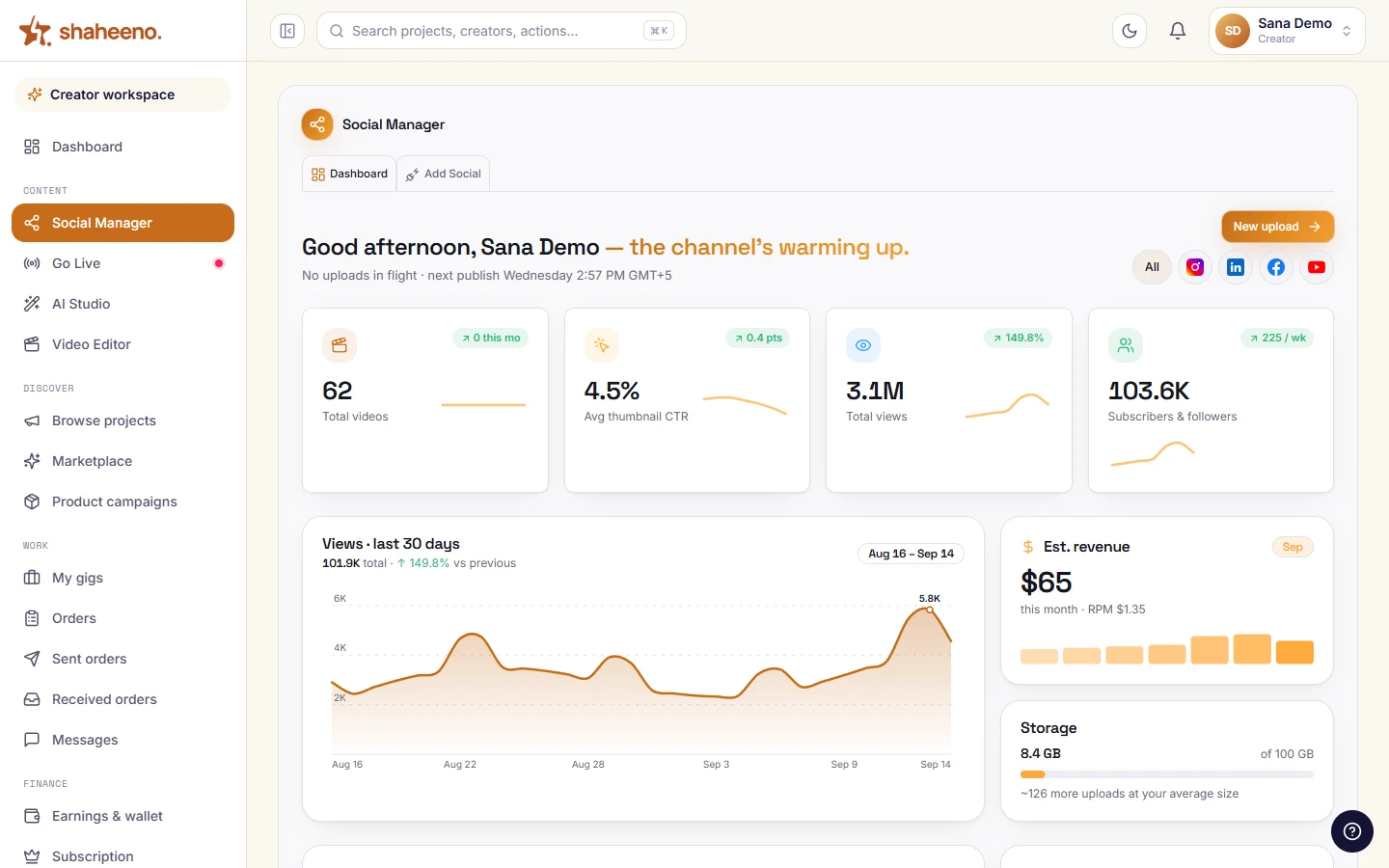
Views, subscribers and uploads from every channel you connected — on one page, or scoped to one platform.
Self-driving demo — hover to pause, click any tab to explore yourself.
What's in it
Connect once, publish everywhere
Two tabs — the dashboard and Add Social — and the rest of the workspace reads from them.
Every channel on one dashboard
Videos, views and subscribers add up across every channel you have connected, each tile with its own sparkline. Tap a platform pill and every number on the page scopes to that platform alone.
Real OAuth, not a paste-your-password form
YouTube, Facebook Pages, Instagram, LinkedIn and TikTok connect through their own sign-in screens. X connects too — profile and follower count; X meters its API per call, so reading replies and messages isn't wired yet, and the card says so.
More than one YouTube channel
Google binds each grant to one channel, so adding a second channel is just connecting YouTube again and choosing it on Google's chooser. One channel is marked Active — that is where Create Post uploads and Go Live broadcasts.
Pages, picked on purpose
A Facebook login with several Pages gets an Active Page selector on its card. Publishing goes to that Page and nowhere else — there is deliberately no hidden per-post override to send a post to the wrong Page.
A comment inbox that replies
The Videos tile opens your YouTube comments; a Facebook card opens the comments on that Page's posts. Reply inline, or let the AI draft one in the viewer's own language and script for you to edit before it sends.
Tokens you cannot leak
YouTube tokens live per channel in a private server-side store; the other providers keep theirs in httpOnly cookies your browser's JavaScript cannot read. Refreshed on the server before they lapse, and disconnecting revokes at Google and Meta.
Connected channels feed the rest of the workspace: the AI Studio publishes and schedules to them, and Go Live broadcasts to them from the browser — same login, same sidebar.
Free for all creators during launch — afterwards included with the Parwaaz and Shaheen plans.
A social media management tool built for creators in Pakistan
Most social media management tools are built for agency teams posting on behalf of brands, priced in dollars per user. Social Manager is the creator's version: connect your own YouTube channels, Facebook Pages, Instagram, LinkedIn and TikTok, see your numbers on one dashboard, answer YouTube and Facebook comments in one inbox, and publish through the AI Studio next door — free for creators during launch, in the same account where brands book and pay you in PKR.
Post to multiple social media at once — what it does, and what it doesn't
Upload a video once in Create Post, pick the destinations, and it goes to YouTube, Facebook Pages, Instagram (as a Reel), LinkedIn and TikTok in one pass, with each platform's rules checked before anything is sent. YouTube and Facebook can be scheduled for later; Instagram, LinkedIn and TikTok post when you submit. It is not an auto-poster that copies everything from one account to another — you choose the destinations for each post — and X and Threads are not publishing destinations.
An AI social media manager that drafts, and you decide
The AI in Shaheeno drafts; it does not post on its own. Press an AI button and Anthropic's Claude writes a title, description and tags from a one-line brief, an overlay line for each thumbnail frame, or a reply to a comment in the viewer's own language — and nothing is published or sent until you have read and edited it. That is the useful part of an AI social media manager without handing your accounts to a bot.
FAQ
Connecting channels, answered
Which platforms can I connect?
YouTube, Facebook Pages, Instagram and LinkedIn connect today with real OAuth, and TikTok connects over its Login Kit — TikTok posts stay private until TikTok's app audit clears. X connects for your profile and follower count; X meters every API read, so replies and messages aren't wired yet, and the card says what it can and cannot do rather than pretending.
Can I connect more than one YouTube channel?
Yes. Google ties each grant to exactly one channel, so you connect YouTube once per channel and pick a different one on Google's chooser each time. Each channel gets its own card, and one is marked Active — Create Post, Go Live and the dashboard's YouTube numbers follow that channel.
Which Facebook Page do my posts go to?
The Active Page on your Facebook card. If your login manages several Pages the card shows a selector; Create Post publishes to whichever Page is active there. There is no per-post override on purpose — an override with no visible picker is an invisible wrong-Page publish waiting to happen.
Are the dashboard numbers real?
The YouTube figures are pulled from YouTube's Analytics API into your studio tables — views, watch time and subscribers per day — and refreshed at most every six hours. Facebook, Instagram and LinkedIn contribute the follower counts from their profile snapshots. Impressions, click-through rate and revenue are not exposed by YouTube's public API, so those tiles show a dash rather than a guess.
Can I answer comments from here?
Yes. The YouTube inbox lists the comments on your videos and lets you reply inline; Facebook cards open the comments on that Page's posts. On either, the AI can draft a reply in the same language and script the viewer used, and nothing sends until you have read it.
Where do my tokens live?
YouTube tokens sit per channel in a private server-side store; Facebook, Instagram, LinkedIn and TikTok tokens sit in httpOnly, secure cookies. None of them is readable by JavaScript in your browser. They are refreshed on the server about a minute before they lapse, and disconnecting revokes the grant at Google and Meta — LinkedIn has no revoke API, so that one is cleared here and removed under LinkedIn's own settings.
How does Social Manager relate to the AI Studio and Go Live?
Social Manager is the accounts side: what is connected and how it is doing. The AI Studio is the production side — thumbnails, metadata, publishing and the calendar — and Go Live is its own studio. All three sit side by side in the creator workspace, and everything the other two publish or broadcast goes to whatever is connected here.
What does it cost?
Social Manager is free for every creator during launch, alongside the AI Studio. Afterwards it stays included on the Parwaaz and Shaheen plans. Go Live is free on every plan.
Can I post to all social media at once?
To the platforms you have connected, yes: one Create Post in the AI Studio publishes the same video or image to YouTube, Facebook Pages, Instagram, LinkedIn and TikTok in one go, checking each platform's rules first. TikTok posts stay visible only to you until TikTok's audit of Shaheeno's app clears, X connects for profile and follower count only, and Threads is not supported.
Is Shaheeno a cross-posting app?
It publishes one upload to several platforms, which is what most people mean by cross-posting — for example sending a vertical video to YouTube Shorts, Instagram Reels and TikTok from one Create Post. It does not watch one account and automatically repost from it to another; you choose the destinations each time.
Does Social Manager have a unified social media inbox?
For YouTube and Facebook, yes: comments on your YouTube videos and on your Facebook Page's posts open in one inbox, where you can reply inline or let the AI draft a comment reply in the viewer's own language and script for you to edit before it sends. Instagram, TikTok, LinkedIn and X comments are not in the inbox yet.
Is it a social media analytics tool?
It is a creator analytics dashboard rather than a full analytics suite: views, watch time and subscribers come from YouTube's Analytics API, refreshed at most every six hours, and the other connected platforms add their follower counts. Click-through rate and revenue are not available from YouTube's public API, so they are shown as a dash rather than estimated.
Can I schedule X or Threads posts?
No. X connects for your profile and follower count only, because X meters every API call, and Threads is not supported. Scheduling in the AI Studio covers YouTube and Facebook; Instagram, LinkedIn and TikTok publish as soon as you submit.