Five tabs, from raw footage to published
Find the thumbnail hiding in your video, design it, write the metadata, publish it for real — or put it on a calendar that never lies to you. Your channels connect in Social Manager, and going live has a studio of its own.
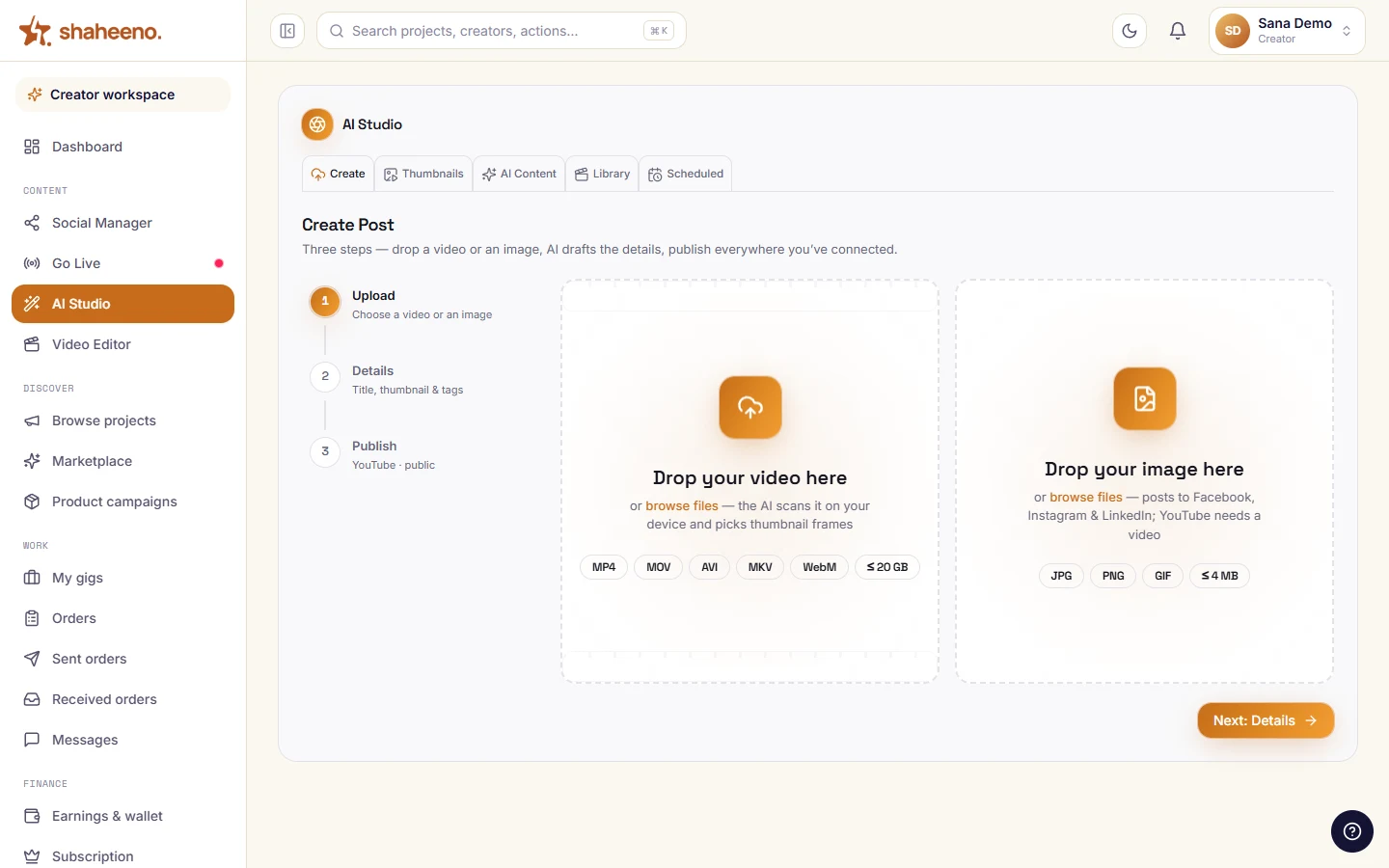
Drop a video or an image, fill the details once, then publish to everything you have connected.
Self-driving demo — hover to pause, click any tab to explore yourself.
5
tabs in the Studio
15
thumbnail templates
18
style packs
32
vector shapes
43
lines per content pack
6
on-device frame passes
1280×720
real PNG export
4
publish destinations
Under the hood
Where the AI actually runs
Named surface by surface, so you know what is a model call and what is your own machine doing the work.
Metadata from a sentence
Create Post → “Start with AI”. Claude reads your one-line brief and writes the title, description, tag set and category.
Overlay copy per frame
Create Post. Every extracted frame gets its own ≤18-character overlay line and a single emoji, chosen for what that frame shows.
Replies in your viewer's language
Social Manager → comment inbox. Claude reads the actual comment and drafts a reply in the same language and script, for you to edit before it sends.
Overlays written to order
Go Live studio. Describe a graphic and Claude Opus writes it as canvas drawing code, which is validated and test-drawn before it is allowed on air.
Frame analysis, on your device
Create Post and Thumbnail Studio. Real pixel work — sharpness, contrast, colourfulness, motion, scene cuts and skin-tone masks — computed in your browser.
Free for all creators during launch — afterwards included with the Parwaaz and Shaheen plans.
Going on air instead? Go Live is its own entry in the workspace — stream from the browser with 59 overlays composited before the send, or hand the keys to OBS.
Cutting the footage rather than publishing it? The browser video editor sits in the same workspace — multi-track timeline, automatic Urdu captions, MP4 or WebM out.
Boundaries
Where your footage and tokens live
Your footage is analysed where it sits
Frame extraction and scoring run in your browser. During analysis, no bytes leave your machine — there is no upload step to opt out of.
Tokens you cannot leak
YouTube tokens sit per channel in a private server-side store; the other platforms' tokens live in httpOnly cookies. Neither is readable by your own JavaScript, and the Studio says so on the page, not in a policy PDF.
One creator, one row
Every read and write is scoped by row-level security in Postgres, so a missing filter is a no-op rather than a leak.
Video goes browser → platform
YouTube uploads stream straight from your browser to Google. Our servers never hold the file.
Quick answers
Studio FAQs
What is actually in the AI Studio?
Five tabs: Create Post, Thumbnail Studio, AI Content, Video Library and Scheduled Posts — finding a thumbnail in your footage, designing it, writing the metadata, publishing or scheduling it, and keeping the calendar honest afterwards. Connecting your accounts lives next door in Social Manager, and going live has its own Go Live studio; all three sit side by side in the creator workspace.
Where do I connect my channels?
In Social Manager, the entry right above the Studio in the sidebar. YouTube, Facebook Pages, Instagram and LinkedIn connect there with real OAuth, and TikTok over its Login Kit; X connects too, for your profile and follower count; X meters its API per call, so reading replies and messages isn't wired yet and nothing publishes there. Create Post and the calendar publish to whatever is linked there.
Does it really publish, or just export files?
It publishes. Create Post uploads to YouTube with a resumable session that survives a dropped connection, pushes chunked video posts to Facebook Pages and LinkedIn, and posts images to Facebook Pages, Instagram and LinkedIn — in sequence, behind a pre-flight check for each platform's rules.
Where did Go Live go?
It is its own entry in the creator workspace now, right under Social Manager, with the same control room: stream from the browser over WebRTC with overlays composited before the send, or hand the RTMP keys to OBS. The full walkthrough lives on the live studio page.
Does my video get uploaded just to find a thumbnail?
No. Frame extraction and scoring run entirely in your browser — seeking the file, drawing frames to a canvas and measuring sharpness, contrast, colourfulness, motion and faces locally. Nothing is sent anywhere during analysis.
Is the thumbnail export a real file?
Yes. The export redraws your whole composition — scene, rays, backdrop, grades and every layer in order — onto a fresh 1280×720 canvas and downloads it as PNG, JPG or WebP. It is not a screenshot of the editor.
What happens if I move a post on the calendar?
If YouTube is holding the video, the Studio rewrites the publish time at YouTube first and only moves your calendar if YouTube accepted. If the platform cannot be updated, the toast says so plainly instead of implying it worked.
Who gets access, and what does it cost?
The Studio is free for every creator during launch. Afterwards it stays included on the Parwaaz and Shaheen plans.